News
NEW: TikTok Integration

You can now publish directly to TikTok from ContentPaul.

Plan your ideas, create your captions, collaborate with your team — and push your videos to TikTok without switching tools.

✅ One workflow
✅ Fewer tabs
✅ Faster publishing


Built for agencies & marketing teams who want content speed without chaos.

👉 Try it in ContentPaul today.

4 months ago
Product Update — 27. November 2025

This update brings visual improvements, more customization options, and important fixes to make your content planning and collaboration even smoother.


New Features & Improvements


Enhanced Calendar Views


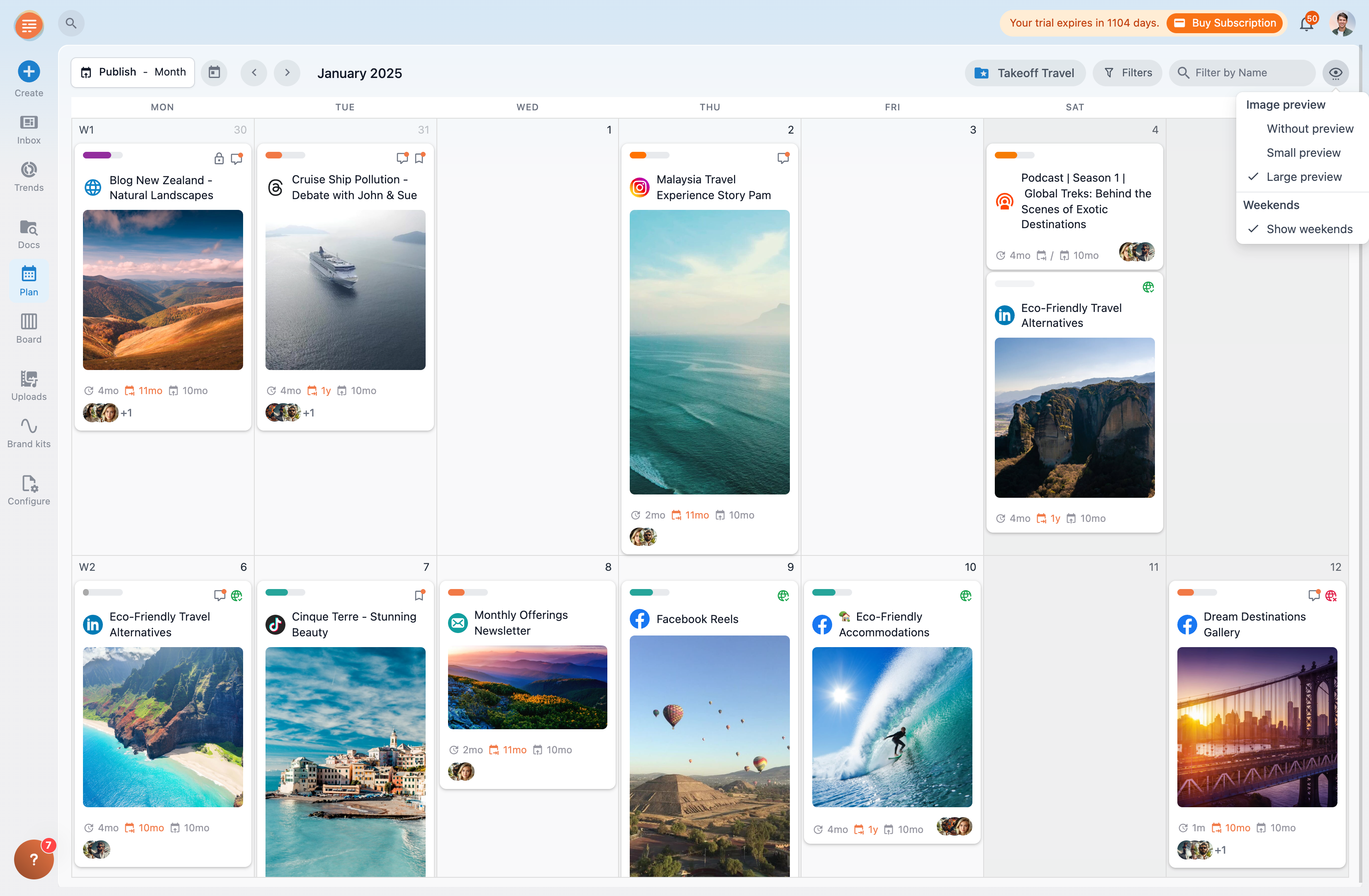
Your ContentPaul calendar just got more beautiful — and more flexible.
You can now choose between three visual modes:

  • No images
  • Small images
  • Large images (new!)

This lets you tailor the calendar to your personal workflow and makes planning your content even more visually engaging.


Inbox Improvements

Your Inbox is now fully customizable.
You can rearrange the boxes in any order you like, so the most important information is always right where you need it.

We've also added a brand-new Pending Approvals box — giving you a dedicated place to review the content that still needs your green light.


Bug Fixes & Enhancements

We resolved several smaller bugs reported by our users to ensure a smoother, more reliable experience across the platform.


Coming Soon


Social Media Reporting

Get detailed insights into your Page/Profile and Post performance directly inside ContentPaul.
We are expecting Meta’s final approval for data usage at the beginning of December and will roll out this feature to all users as soon as possible.


TikTok Publishing

The integration is complete — we’re now waiting for TikTok’s API approval.
If everything goes as expected, you’ll be able to publish directly to TikTok starting mid-December.


Meta Ads Publishing

We’re working on a deep integration with the Meta Ads ecosystem.
This will allow you to sync creatives between ContentPaul and your Meta ad campaigns — making ad creation and management far more seamless. If you’re interested in becoming one of our beta testers, just reach out to us via the chatbox.

5 months ago
Product Update — 17. October 2025

This update introduces new features, improvements, and important fixes to make your content creation and publishing even more reliable.


New Features and Improvements

  • Template Policy & Requirements
    To ensure that your content — especially for social media — meets platform-specific requirements, ContentPaul now automatically checks your content before publishing.
    Any issues or inconsistencies are highlighted with labels directly inside the content block.
    This feature is part of a larger rollout and will be gradually introduced across all templates in the coming weeks.
  • Refreshed Notification Emails
    Our notification emails have received a visual and content refresh — we hope you like the new look and feel.
  • Publishing Retry
    If a social media post fails to publish and no specific error is returned from the network (for example, “Unknown Error”), ContentPaul will automatically retry publishing after 5 minutes.
    The system will attempt this up to three times.
    During the waiting period, you can manually cancel the retry process at any time.

Bug Fixes and Enhancements

  • The order of content blocks in Custom Structures can now be changed again.
  • Fixed an issue when syncing versions after updating the publishing date.

Coming Soon

  • Social Media Reporting
    Get insights into Page/Profile and Post performance directly inside ContentPaul.


6 months ago
Product Update — September 2025

We’ve just rolled out a major update packed with powerful improvements to make your content creation and scheduling even smoother. Here’s what’s new:


New Features

  • Smarter Calendar Scheduling
    When you move an already scheduled item in the calendar, the publishing date now updates automatically.
    If versions exist, you’ll be asked whether you want to sync their dates too — keeping everything perfectly aligned.
  • New Stock Photo Library
    Access more than 7 million high-quality, royalty-free images directly inside ContentPaul to level up your visuals.
  • New Stock Video Library
    We’ve added a brand-new collection of royalty-free stock videos to enhance your content creation.
  • Faster AI Assistant
    Text generation is now streaming in real time, making content creation feel instant.
  • Brand Voice: Custom Rules
    Fine-tune your tone and style by adding custom rules to your Brand Voice for even more consistent messaging.
  • Simplified Templates for Social Media
    Templates for Facebook, Instagram, and LinkedIn are now easier to use and include updated preview layouts for a more accurate look.
  • New Template Category: Advertising
    Create ads faster with ready-to-use templates for:
    • Meta Ads
    • Google Search Ads
    • LinkedIn Ads
    • TikTok Ads
    • X (Twitter) Ads

Minor Updates

  • Fixed Word Document downloads
  • Fixed LinkedIn multi-image publishing after recent API changes
  • Added support for HEIC photo format uploads

Coming Soon

  • Social Media Reporting
    Get insights into Page/Profile and Post performance directly inside ContentPaul.


7 months ago
Neues Nutzererlebnis bei ContentPaul – ab 3. April verfügbar

Ab dem 3. April erhält ContentPaul ein umfassendes Update mit einem neuen Look & Feel. Die Benutzerführung wurde in vielen Bereichen überarbeitet, um eure Content-Prozesse noch effizienter und intuitiver zu gestalten.


Das sind die Highlights:

  • Neu designte Inbox mit direktem Zugriff auf geplante Beiträge, Freigaben und Kommentare.
  • Einfachere Beitragserstellung dank Template-Auswahl und direkter Ablageoption.
  • Verbesserte Navigation durch Ordner und Workspaces – jetzt noch schneller.
  • Zentralisierte Einstellungen für Profil, Sprache, Integrationen und mehr.
  • Überarbeiteter Kalender, der Inhalte kompakter und visuell darstellt.


Detaillierte Informationen und Anleitungen findest du in unserem Blog.
👇👇👇

10 months ago
Canva Integration

Für alle, die Canva lieben und Content schneller und smarter erstellen wollen:

Ab sofort kannst du deine Canva-Designs direkt in ContentPaul nutzen! 🎨✨


Mit nur einem Klick landen deine Visuals aus Canva in ContentPaul – bereit, um deine Social Media Posts, Newsletter, Blogartikel oder Landingpages zu bereichern.


Und das Beste?
Wenn du ein Design in Canva aktualisierst, kannst du die neue Version automatisch in ContentPaul synchronisieren. So bleibst du immer auf dem neuesten Stand und kannst effizient weiterarbeiten, ohne ständiges Hin- und Herschicken von Dateien.


Die Integration ist ab sofort für alle ContentPaul-Accounts live.

last year
Facebook Seiten taggen in ContentPaul

Bequem in ContentPaul eine Facebook Seite taggen und direkt auf Facebook posten.

Ab sofort kannst du in deinen Facebook Posts ganz einfach andere Facebook Seiten taggen

  • Tippe das @-Symbol und die ersten Zeichen der Seite
  • Es öffnet sich ein Drop-Down mit den vorgeschlagenen Seiten
  • Klicke auf die Seite, die du suchst
  • Der Link wird automatisch eingefügt

Zur Info: In Facebook können nur Facebook Pages und keine Personen getagged werden.

last year
Neue Funktionen in der Artikel Übersicht

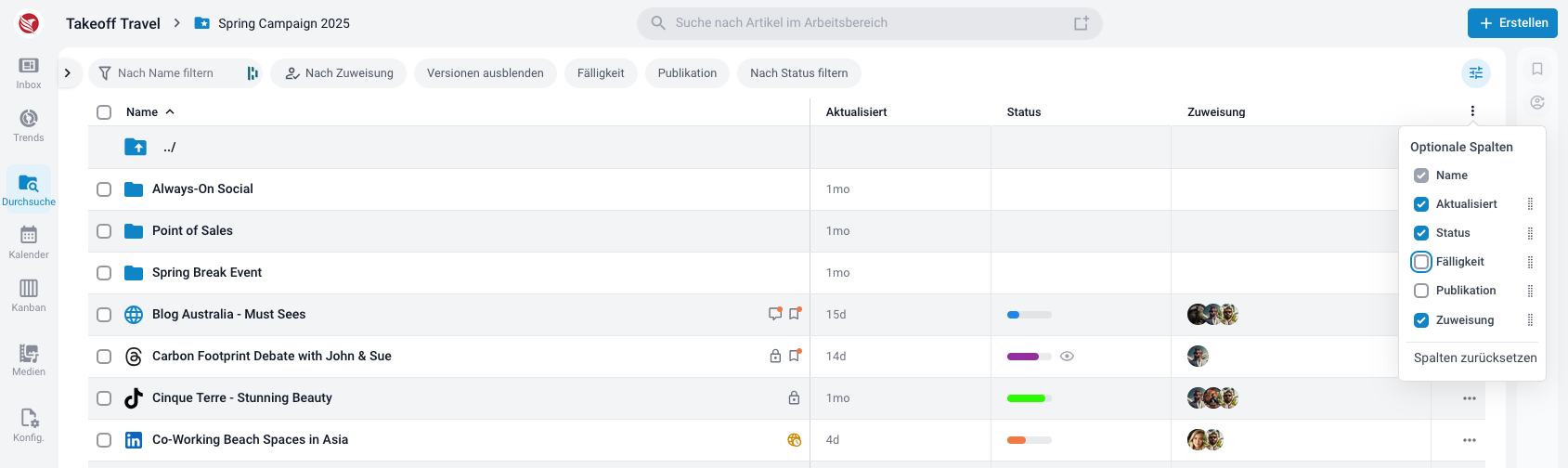
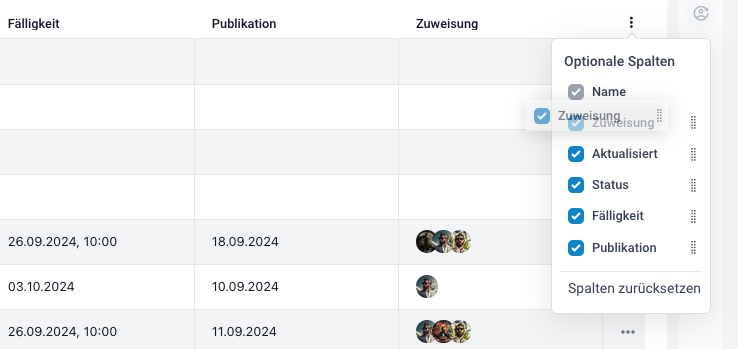
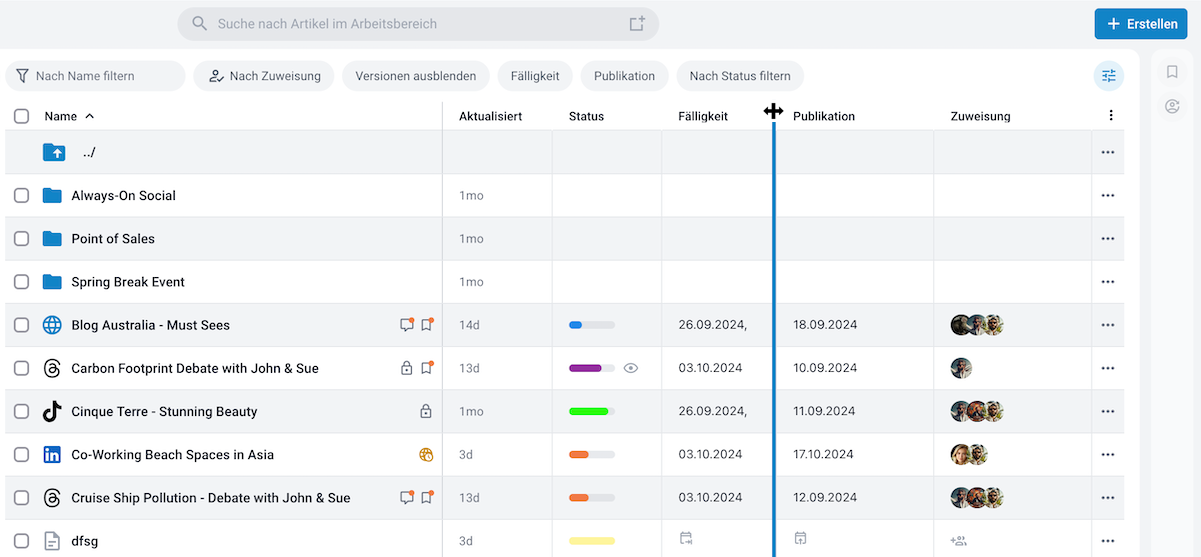
Klicke auf "Durchsuche" (oder "Browse") und nutze die neuen Funktionen deiner Artikel-Ansicht:

  • Wähle aus, welche Spalten angezeigt werden
  • Entscheide, in welcher Reihenfolge diese angezeigt werden
  • Du kannst auch die Grösse der Spalten verändern


last year
Seiten oder Personen Taggen auf LinkedIn

Jetzt bequem aus ContentPaul Seiten oder Personen taggen und direkt auf LinkedIn posten.

  • tippe einfach @ und dann den exakten Namen der Person oder Seite, die du taggen willst
  • statt Leerschlägen nutze "-" oder "_" oder "."
  • Wenn die Person oder Seite angezeigt wird, mit Klick bestätigen und dann wird der Tag im Text eingefügt.
  • Wenn du den Post mit ContentPaul publizierst, wird die getaggte Person oder Seite im Post verlinkt.


Wichtig: Du musst unter Einstellungen > Integrationen > LinkedIn auf "Wieder verbinden", um diese Funktion freizuschalten


ACHTUNG: Es gibt Einschränkungen der Funktion auf Seiten LinkedIn

  • Aktuell wird dir nur das exakte Suchresultat für Firmen-Seiten angezeigt. Wir arbeiten an der Liste, wir sind wir jedoch auf LinkedIn angewiesen, die leider sehr restriktiv sind und ihre Antwortzeiten dauern lange.
  • Bei der Personen-Suche gibt es noch weiterführende Einschränkungen:
    • Es können nur Personen nachgeschlagen werden, die Kontakte des verknüpften Accounts sind.
    • Es werden nur Personen angezeigt, die auch ein englischsprachiges Profil haben (en_US). Das ist im deutschen Sprachraum leider nicht sehr oft der Fall.
    • Personen werden auch dann nicht angezeigt, wenn in den Einstellungen > Sichtbarkeit > Sichtbarkeit des Profils außerhalb von LinkedIn ausgeschaltet haben.


last year
Wir sind für dich da!

Nutze unser Hilfe Button, wenn du nicht weiter weisst: In der Ecke unten rechts findest du den Hilfe Button. Achtung: zu Zeit ist unsere Hilfe erst noch in Englisch, die deutsche Übersetzung folgt jedoch zeitnah.

Mit Klick auf den Button öffnet sich folgende Auswahl:

  • Home: Nützliche Links auf wichtige Hilfe-Artikel. Hier findest du auch den Link zum Help Center mit allen Hilfe-Artikel. Oder suche direkt nach einem Stichwort und erhalte die passenden Artikel angezeigt.
  • News: Hier veröffentlichen wir alle Neuigkeiten, neue Features und alles Wissenwertes
  • Give feedback: Sollte mal was nicht funktionieren oder du hast ein Feedback wie man es besser machen könnte - hier kannst du ganz einfach einen Screenshot oder ein Video der Seite/Stelle erstellen und uns übermitteln
  • Chat: Schreibe uns - wir werden dir so schnell wie möglich antworten.


last year
Poste dein FB Reel direkt aus ContentPaul

Ab sofort kannst du deine FB Reels bequem aus ContentPaul heraus planen und posten.

Nutze die Facebook Reels Vorlage, füge deine Inhalte hinzu und publiziere den Post direkt aus ContentPaul als Facebook Reel auf dem von dir ausgewählten Kanal.

last year
Anordnung der Bilder in FB/LI Galerie

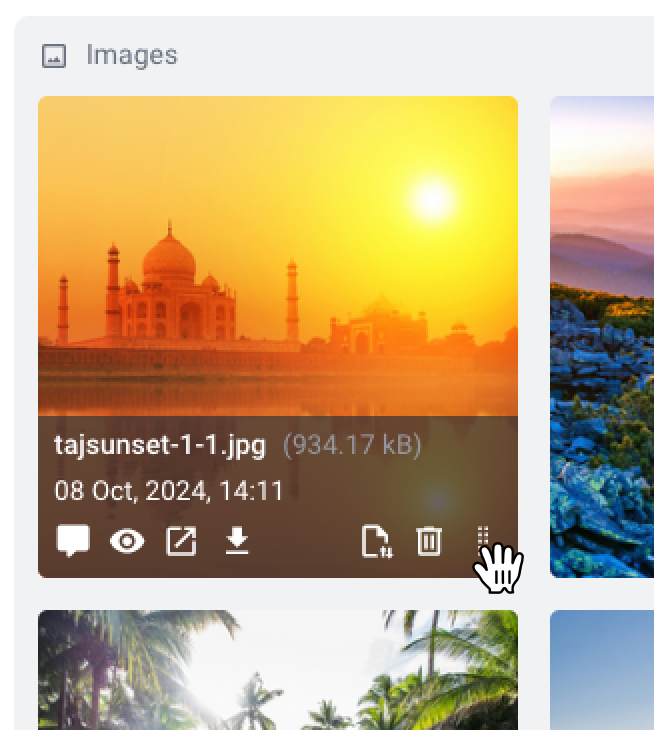
Nachdem du die Bilder für deine Galerie hochgeladen hast, kannst du ganz einfach die Anordnung anpassen.

  • Wenn du mit der Maus über ein Bild fährst erscheint der graue Balken mit den verschiedenen Funktionen
  • In der rechten Ecke neben dem Papierkorb hat es ein Halten-Icon
  • Klicke auf dieses und halte die Taste gedrückt.
  • Nun kannst du das Bild an die gewünschte Position schieben
  • Du kannst die neue Anordnung in Echtzeit in deinem Preview überprüfen

last year
Mehr Farbe!

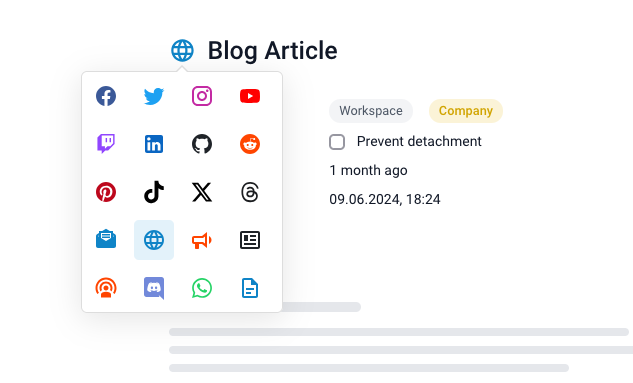
Ab sofort kommen die Content Artikel mit einem farbigen Icon. Und sorgen für Orientierung und verbreiten gute Laune 😎

  • Beim Erstellen eines Templates kannst du nun aus einem der vielen farbigen Icons auswählen
  • Wähle das Icon, das deinen Inhalt am besten repräsentiert: Blog, Newsletter, Social Media (je Kanal), und viele mehr

last year