
Adding Comments When Updating Status
When changing the status of one or multiple content items in ContentPaul, you have the option to add a general comment. This feature enhances communication and ensures that all relevant users are informed of the status change and any additional instructions or context. Below is a detailed explanation of how this feature works and its benefits.
Adding a Comment During Status Updates
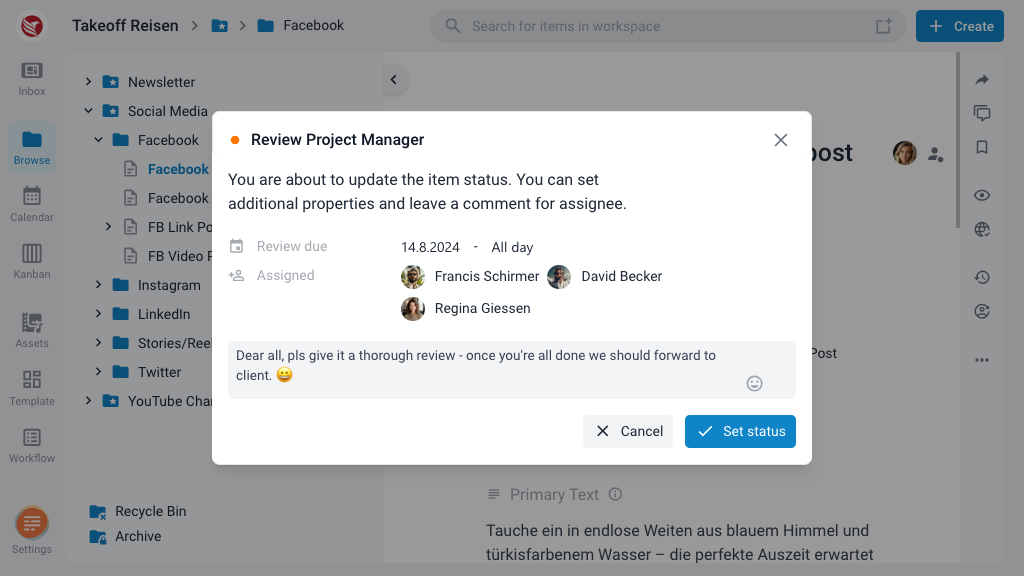
When you update the status of content items, you can include a general comment. Here’s how it works:
- Select the Content Item(s): Navigate to the content item(s) you wish to update.
- Change the Status: Choose the new status from the available options.
- Add a Comment: A comment box will appear, allowing you to type in your message. This comment provides context or instructions related to the status change.
Display of Comments
The comments added during status updates are displayed in two primary ways:
- Notification: Assigned users will receive a notification containing the comment. This notification ensures that all relevant users are immediately aware of the status change and any additional information provided.
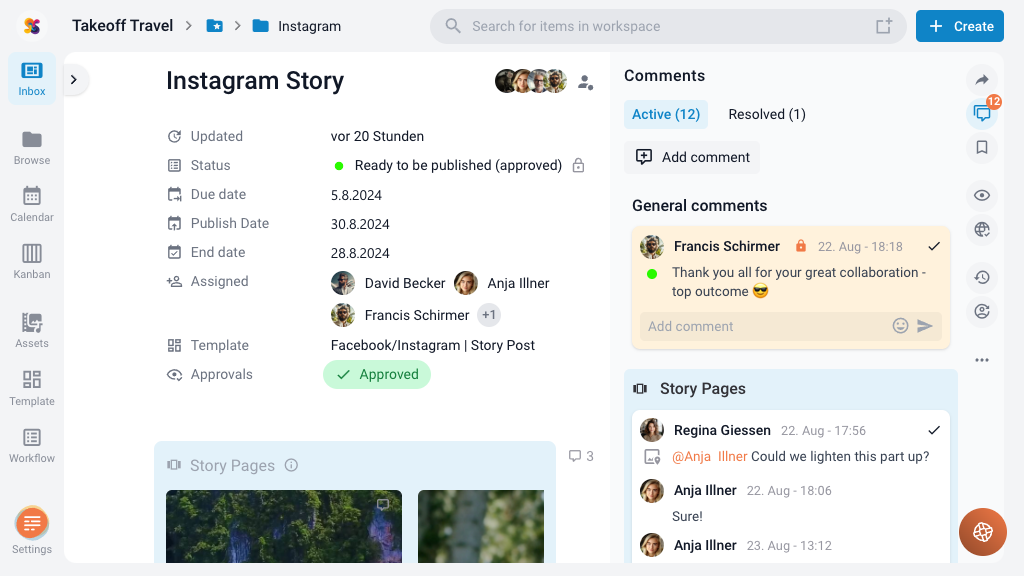
- Comment Panel: The comment will also be visible in the comment panel of the content item. This panel provides a consolidated view of all comments related to the content, making it easy to reference past discussions and updates.
Practical Uses and Benefits
Workflow Updates
When updating the workflow status of a content item, such as moving it from "In Progress" to "Review," you can add a comment to:
- Inform the next assigned users of their upcoming tasks.
- Provide specific instructions or context related to the new status.
- Clarify any changes or decisions made during the status update.
Assigning New Users
If new users are assigned to a content item during a status update, a comment can:
- Introduce the task or project to the new assignees.
- Outline their responsibilities and expected actions.
- Provide any necessary background information or resources.
Enhancing Communication and Collaboration
By providing a clear and detailed comment when updating the status, you ensure that all assigned users are on the same page. This practice:
- Improves Communication: Clear comments reduce misunderstandings and ensure that all team members have the information they need.
- Facilitates Smooth Transitions: Detailed instructions help new assignees understand their tasks and responsibilities quickly, leading to smoother workflow transitions.
- Maintains Context: Comments preserve the context of status changes, making it easier for team members to track progress and understand the history of the content item.
Adding comments when updating the status of content items in ContentPaul is a powerful feature that enhances communication and collaboration. By ensuring that all relevant users are informed of status changes and provided with clear instructions, you facilitate smoother workflow transitions and more efficient task completions.