
Version: Side-by-Side View
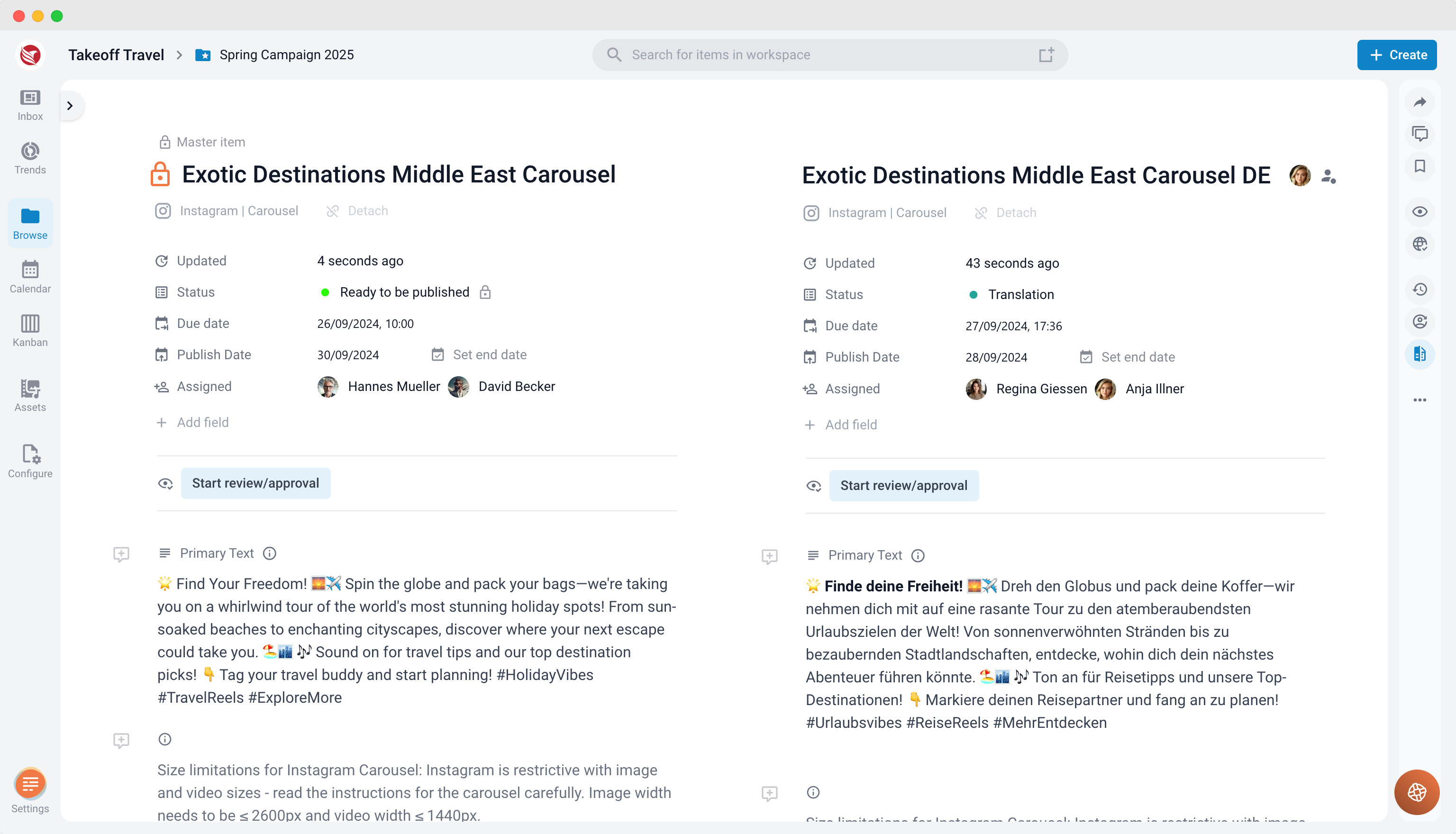
The Version Side-by-Side feature is a powerful tool for content editors who need to manage and compare different versions of content items effectively. This feature is particularly useful for tasks such as translations, A/B testing, and creating versions for different social media platforms. It allows you to view the Master Version alongside a specific version of your content, making it easier to ensure consistency and quality across all variants.
Activating the Side-by-Side View
To activate the Side-by-Side view:
- Select a Version: Choose the version of the content you wish to edit.
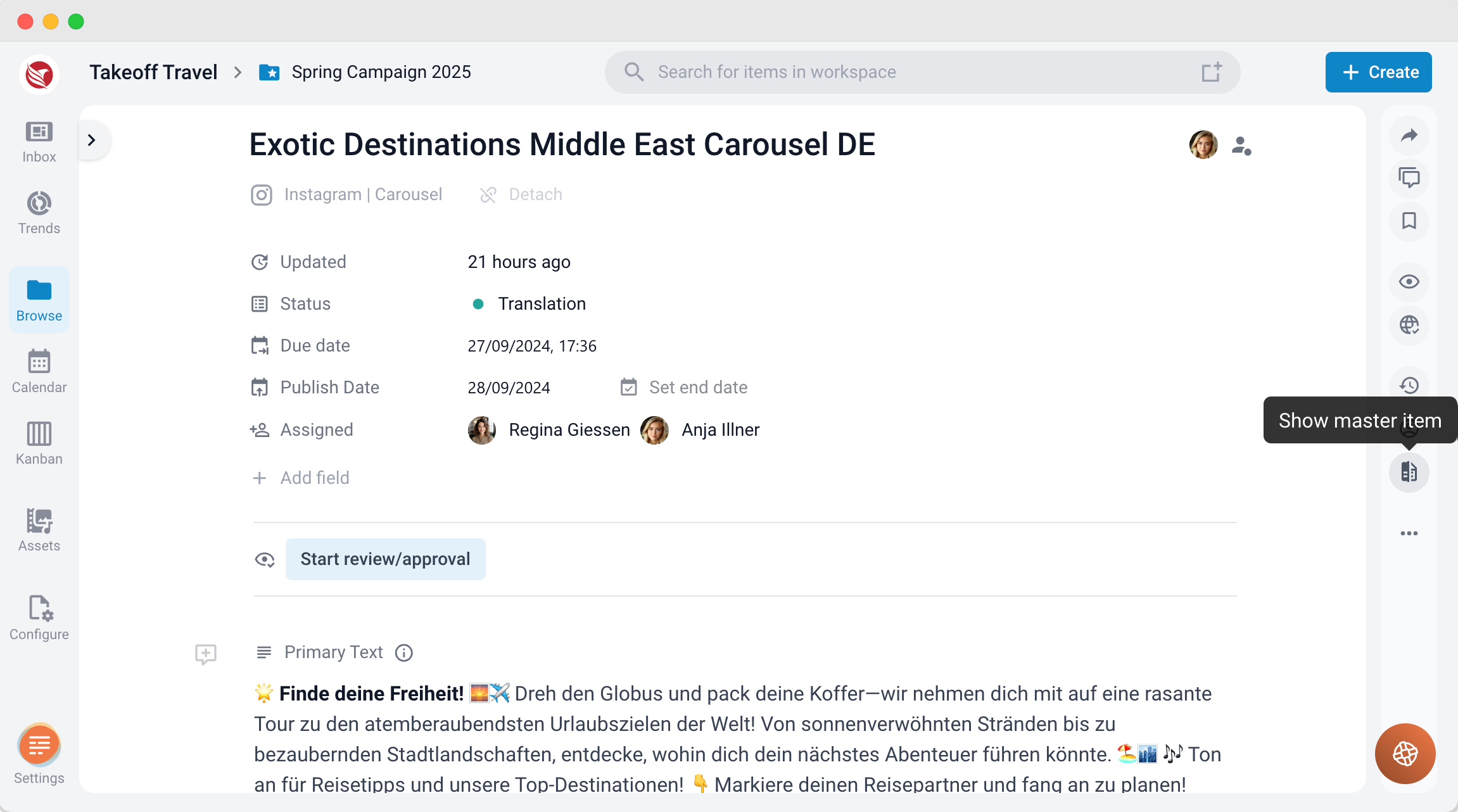
- Activate the Feature: Click the “Show Master Version” button located in the right navigation bar.
- View and Edit: The Master Version will be displayed on the left side of the screen. This version is locked and cannot be edited, ensuring it remains unchanged. On the right side, the selected version will be displayed, where you can freely edit the content as needed.
Key Use Cases for the Side-by-Side View
- Translations Made Easy
Managing translations can be challenging, especially when ensuring that the translated content remains true to the original. The Side-by-Side view addresses this challenge by allowing you to display the original Master Version alongside the translation. This setup enables you to:- Compare texts directly, ensuring accuracy and consistency.
- Make real-time adjustments to the translation while referencing the original content.
- Save time and enhance the quality of your translations by reducing the need to switch between different screens or documents.
- A/B Testing Iterations Under Control
A/B testing often involves making slight tweaks to content versions to determine which performs better. The Side-by-Side view is ideal for this process as it allows you to:- Quickly identify the changes made between the Master Version and the test version.
- Compare content variations directly, ensuring that all modifications are intentional and aligned with your testing goals.
- Streamline the iteration process, making it easier to refine and optimize your content based on test results.
- Easily Compare Versions for Different Social Media Platforms
Each social media platform has its own unique requirements, including character limits, media formats, and audience expectations. The Side-by-Side view is particularly useful when creating and comparing versions tailored for different platforms:- Instagram, Facebook, Twitter, LinkedIn: Adjust content to meet the specific needs of each platform, ensuring optimal engagement and performance.
- Real-Time Comparison: View the differences between versions side-by-side, making it easier to tailor content for each platform's audience.
- Enhanced Efficiency: This feature allows you to see all necessary adjustments in one place, reducing the time and effort required to produce platform-specific content.
Benefits of the Side-by-Side View
- Improved Accuracy: Directly compare the Master Version with its variants, ensuring consistency and quality across all content versions.
- Enhanced Efficiency: Reduce the time spent navigating between different versions by viewing them side-by-side in a single interface.
- Streamlined Workflow: Simplify the editing and review process, whether you're managing translations, conducting A/B testing, or adapting content for various social media platforms.
- Increased Content Effectiveness: Tailor your content more effectively for different audiences and platforms, boosting engagement and overall content performance.
The Version Side-by-Side feature is an essential tool for content editors who need to manage multiple versions of their content. Whether you're working with translations, A/B testing, or platform-specific adaptations, this feature provides the flexibility and control necessary to ensure your content is accurate, consistent, and optimized for its intended audience.