
Bulk Actions for Multiple Items
The Bulk Action feature is an invaluable tool designed to streamline the management of multiple items simultaneously. This functionality allows users to efficiently organize and modify selected items by applying various actions at once. By using Bulk Actions, you can save time and significantly simplify content management, making it easier to handle large volumes of items.
Available Actions in Bulk Mode
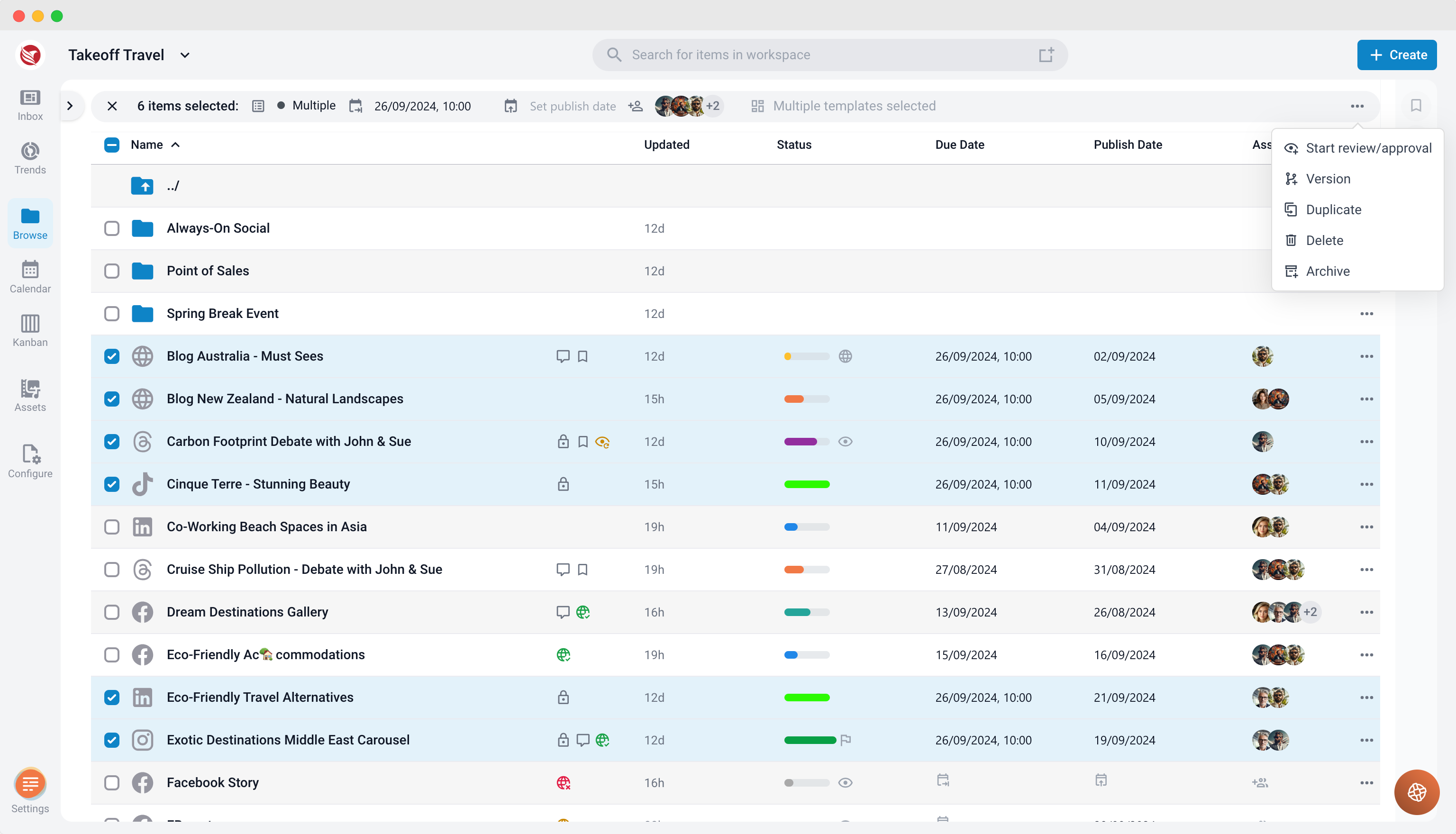
With the Bulk Action feature, you can perform a wide range of actions on multiple items at the same time, including but not limited to:
- Changing Due Dates or Publish Dates: Adjust the deadlines or publishing schedules for several items simultaneously, ensuring that timelines are consistent across your projects.
- Assigning Items: Assign multiple items to a specific user or group, facilitating collaboration and ensuring that tasks are distributed efficiently within your team.
- Updating Status: Change the status of several items in one go. This is particularly useful for keeping track of progress and ensuring that all items are aligned with your current workflow.
- Deleting Items: Remove multiple items from your project at once, helping to keep your workspace clean and organized by eliminating unnecessary content.
- Moving Items: Relocate several items to a different folder or project area in one operation, making it easier to reorganize your content structure.
- Archiving Items: Archive multiple items together to declutter your workspace without permanently deleting content that might be needed in the future.
- Applying Templates: Apply a predefined template to several items at the same time, ensuring consistency in formatting, structure, or content requirements.
- Creating Versions: Generate new versions of multiple items simultaneously, enabling you to maintain version control across your projects with ease.
How to Use the Bulk Action Feature
- Select Items: Begin by selecting the items you wish to modify. You can typically do this by checking the boxes next to each item or by using the "Select All" option if you want to apply the action to all items in a particular view.
- Choose an Action: Once your items are selected, choose the desired action from the bulk action menu. This menu is accessible from the toolbar in the head of your content management interface.
- Apply the Action: After selecting the appropriate action, confirm your choice. Depending on the action, you may need to provide additional details, such as setting a new due date or choosing a destination folder.
- Review: Review the changes to ensure they are correct.
Benefits of Using Bulk Actions
- Time Efficiency: Bulk Actions significantly reduce the time required to manage multiple items, especially when dealing with large quantities of content.
- Improved Organization: By applying consistent actions to groups of items, you can keep your content well-organized and easier to navigate.
- Enhanced Collaboration: The ability to assign or update the status of multiple items at once supports better team coordination and communication.
- Greater Control: With Bulk Actions, you can maintain better control over your content, ensuring that all items are up to date and correctly managed.
The Bulk Action feature is an essential tool for increasing productivity and efficiency in content management. Whether you need to reorganize, update, or streamline your workflow, Bulk Actions provide a powerful and flexible solution to manage multiple items with ease.